
- Clouds Tech FZE, D-OFF-134, Techno Hub, Dubai Silicon Oasis, Dubai, UAE
Maximize your existing IT investments by transforming your Microsoft 365 subscription into an automated, highly secure endpoint backup repository. CrashPlan allows UAE enterprises to seamlessly pool unused OneDrive for Business storage into a virtual, secure, and completely invisible vault. This architecture gives your IT teams centralized control over distributed organizational data while preventing end-user tampering, reducing ransomware risks, and dropping your storage TCO by up to 70%.

Protect Business-Critical Data, no matter where it lives using Microsoft365 for workstation backup. Using Crashplan, you enforce a reliable and secure endpoint backup process, enterprise-wide and across geographies, ensuring that the data associated with all your user endpoints are always available and easily restorable.
Save up to 70% on your storage cost to back up desktop/laptop data using Crashplan’s BluVault. Crashplan provides Centralized Management of workstation backup with features like encryption, compression, de-duplication, CPU & Network Throttling.
Endpoints have become critical devices for organizations as employees are carrying a lot of sensitive information on desktops/laptops. Parablu’s award-winning endpoint backup solution helps you make the most of your subscriptions to Microsoft 365 for workstation backup by efficiently utilizing OneDrive for Business storage as your backup repository. Using Parablu, you enforce a safe and reliable endpoint data backup process, enterprise-wide and across geographies, ensuring that the data associated with all your user endpoints are always available and easily restorable. ParaBlu stores the data in an invisible secure vault so that end-users cannot tamper with the same.
Protect Business-Critical Data, no matter where it lives using Microsoft365 for workstation backup. Using Parablu, you enforce a reliable and secure endpoint backup process, enterprise-wide and across geographies, ensuring that the data associated with all your user endpoints are always available and easily restorable.
Save up to 70% on your storage cost to back up desktop/laptop data using ParaBlu’s BluVault. ParaBlu provides Centralized Management of workstation backup with features like encryption, compression, de-duplication, CPU & Network Throttling.
CrashPlan runs silently and continuously in the background across Windows, macOS, and Linux fleets to secure organizational data without interrupting workforce productivity. Supported by AES 256-bit enterprise encryption both in transit and at rest, your critical intellectual property remains completely protected against external compromise.
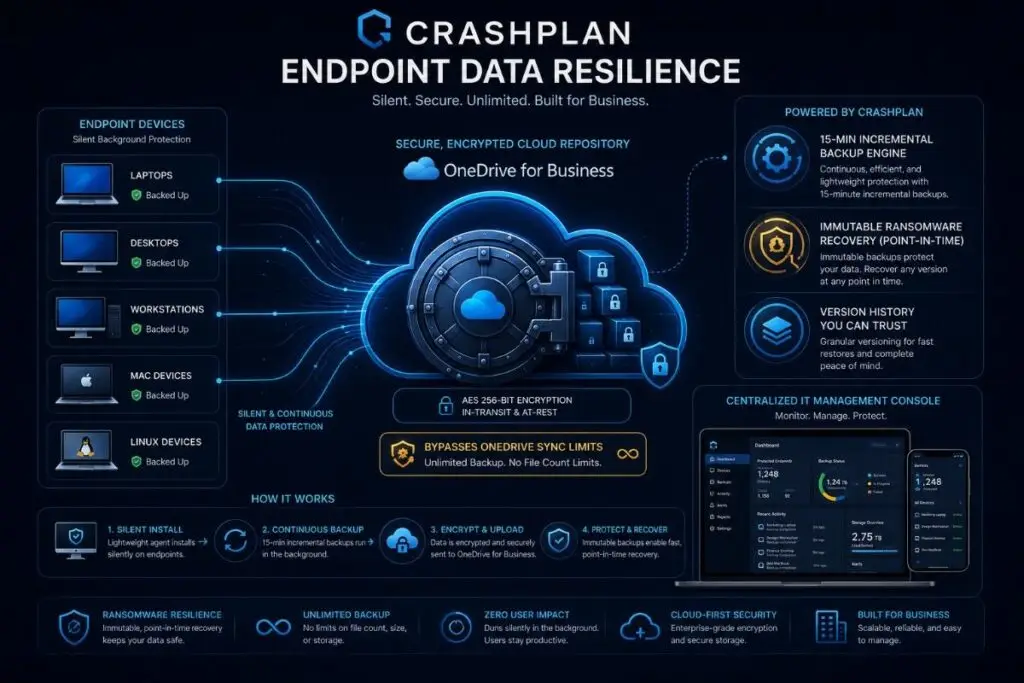
An enterprise-grade backup solution, BluVault is designed to help you accomplish a highly secure data backup to the cloud. Supported by BluKrypt™ – a secure container enabled by a privacy gateway – your data travels to and from the cloud fully encrypted and is kept secure even at rest. Further supported by data compression and de-duplication for storage and network bandwidth savings, endpoint data backup to the O365 cloud can happen fast, easily, and reliably with Microsoft365 for workstation backup.
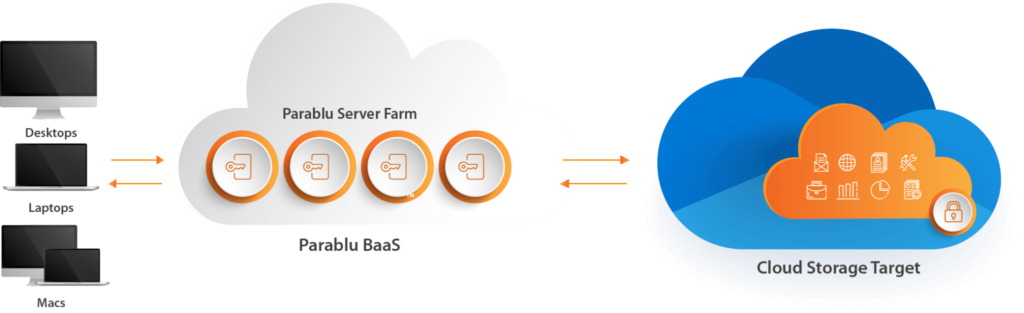
BluVault can leverage your existing OneDrive for Business storage subscriptions for all your endpoint data backups. It means no additional investment in storage infrastructure with a secure backup solution on the cloud with zero storage cost.
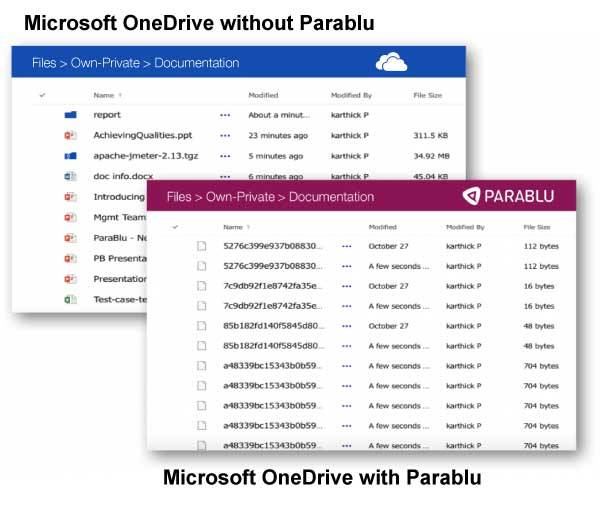
BluVault can utilize your OneDrive storage allocations as a storage unit for all your endpoint backups while eliminating limitations inherent in OneDrive. Restrictions like file/folder sizes, special characters, and upload/download limits among others can be a thing of the past.
BluVault makes secondary copies of files to OneDrive, no matter where they live on the endpoint – not just a few folders that OneDrive sync supports. Specify folders to exclude or include during backups and even locked files such as PST files are backed up seamlessly.
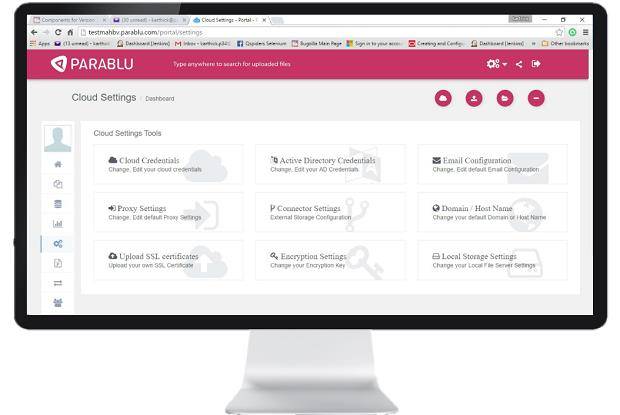
BluVault enables backup to OneDrive and offers a wide array of configurability via its backup policies. Centralized, policy-based control makes user management, backup scheduling, and file/folder selections (or exclusions) a cinch.
All critical touchpoints on the system get recorded, time-stamped, and audited automatically. The centralized web console offers a one-stop view through a dashboard and ready, schedulable reports that cover granular details of all activity.
BluVault takes an initial full backup and only backups up incrementally changed data subsequently. Files bigger than a certain threshold are further processed using our Partial File Incremental backup algorithm which only transmits the changed portions of such files (like PSTs).
You can download the datasheet for workstation backup here.
CrashPlan is a cloud-native enterprise data resilience platform engineered for continuous, automated background backup across distributed Windows, macOS, and Linux endpoint fleets. It provides centralized IT control over file recovery, eliminates distributed data loss risks, and maintains robust data continuity without impacting employee productivity.
CrashPlan utilizes a patented storage virtualization architecture to pool unused storage allocations from your existing Microsoft 365 subscription into a hidden, secure container. This eliminates native OneDrive file-type and size syncing limitations, allowing enterprises to establish an automated backup repository with zero added storage infrastructure costs.
CrashPlan neutralizes active ransomware threats by segmenting file modifications into encrypted data blocks and storing them under an immutable, unlimited version history. If a network device becomes compromised, IT administrators can perform point-in-time restores to return files to a known-good state, completely avoiding ransom payouts.
Yes, CrashPlan aligns enterprise data governance with strict regulatory frameworks, including mandatory UAE NESA, SIA, ISO 27001, and SOC 2 compliance standards. The platform provides automated retention enforcement, localized data residency options, and tamper-proof compliance logs to ensure audit readiness across your entire organization.
Cloud synchronization tools like standard OneDrive mirror file deletions, sync errors, and ransomware infections in real time, whereas a true endpoint backup creates an independent, multi-version record. CrashPlan ensures that deleted items, modified metadata, and historical file states remain fully accessible and protected from end-user or malware tampering.
A standard enterprise deployment typically ranges from one to two hours for initial project scoping, client-side encryption configurations, and Active Directory role mapping. Distributed via Clouds Dubai, the agent can be silently pushed to thousands of remote hardware assets simultaneously with zero operational network downtime.
Migrating your legacy systems to CrashPlan doesn’t have to be complicated. Clouds Dubai handles the entire deployment, policy configuration, and directory synchronization with zero operational downtime and full local engineering support, allowing you to activate advanced endpoint resilience in your active environment completely risk-free.