Eliminate passwords entirely, prevent phishing, and enable seamless, secure access with Idenprotect Passport.
Idenprotect provides passwordless authentication, identity protection, and access control for enterprises. It focuses on eliminating the risks associated with traditional password-based systems by using certificate-based, cryptographic authentication methods. It is ideal for organizations seeking secure, user-friendly authentication across hybrid IT environments.
Passwords are the weakest link in your security chain, vulnerable to a multitude of attacks. Phishing scams trick users into revealing their credentials, brute-force attacks relentlessly attempt to guess them, and password reuse across multiple accounts amplifies the damage of a single breach. This leads to costly security breaches, damaging data loss, and significant financial repercussions. Moreover, users are frustrated by the complexity of password policies, the inconvenience of frequent resets, and the constant disruption to their workflow caused by traditional authentication methods.
Idenprotect Passport offers a modern solution to these challenges. By eliminating passwords entirely and leveraging biometric authentication on users’ mobile devices, Idenprotect provides a robust and user-friendly authentication experience. This not only significantly strengthens your security and mitigates the risk of credential-based attacks but also enhances user satisfaction and boosts productivity by streamlining access to applications and systems.
Leading Passwordless Authentication in UAE
Traditional passwords have become the primary entry point for cyber threats targeting high-value enterprise data in the digital landscape of Dubai and wider Emirates. As a dedicated provider of Passwordless Authentication in UAE, Clouds Dubai offers IdenProtect Passport to help local organizations bridge the gap between high-level security and convenience. By moving away from vulnerable, character-based credentials and adopting certificate-based, cryptographic models, your organization can eliminate the risk of phishing and brute force attacks that target the Middle East businesses. This transition is a critical defense mechanism, particularly when implementing phishing-resistant MFA that is used to protect your hybrid staff from sophisticated bypass attacks. Our localized expertise guarantees that your deployment is fully optimized for the unique regulatory and operational standards of the modern UAE infrastructures, providing a seamless and secure path toward aZero Trust future.
Users enrol their mobile device with Idenprotect Passport, linking it to their identity and enabling biometric authentication.
The user installs the Idenprotect app or client on a trusted device (e.g., laptop, smartphone).
The device generates a public-private key pair.
The public key is securely registered with the Idenprotect server and linked to the user’s identity.
The private key never leaves the device and is securely stored (in a secure enclave or TPM).
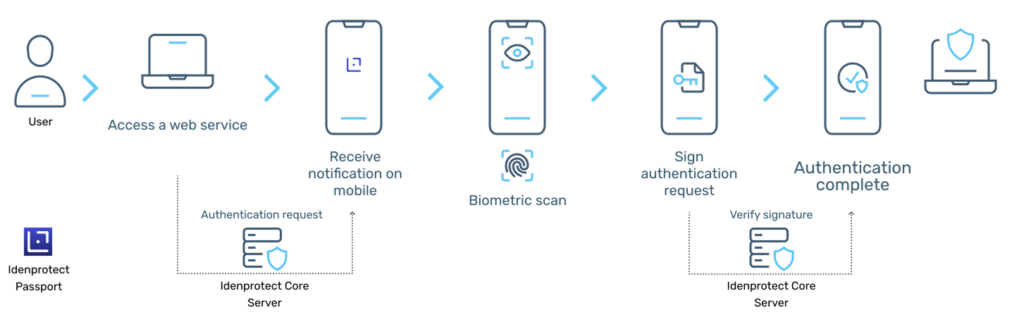
Upon successful biometric verification, Idenprotect Passport grants access to the requested resource.
Once authenticated, the user can seamlessly access multiple connected systems through SSO, without repeated logins or MFA prompts.
When a user attempts to access a protected application or system, Idenprotect Passport initiates an authentication request.
When the user tries to access a protected application (like Office 365, VPN, internal systems), the Idenprotect platform:
Detects the identity of the user via the registered device.
Triggers the authentication flow without asking for a password.
The user securely verifies their identity using their device’s fingerprint or face recognition.
Organizations can enforce biometric user verification methods, such as fingerprint or Face ID.
This ensures that only the legitimate device holder can use the private key.
Passwordless authentication in Idenprotect is built around cryptographic device identity, making the user’s device itself become the authenticator—securely replacing traditional usernames and passwords.
Windows 10 (version 1809 and later), Windows 11, macOS 10.15 and later, iOS 13 and later, Android 7.0 and later.
AUTHENTICATION METHODS
Biometric authentication (fingerprint, face recognition) via device secure enclave, Multi-Factor Authentication (MFA) push notifications, Time-based One-Time Passcodes (TOTP).
INTEGRATION CAPABILITIES
SAML 2.0 for Single Sign-On (SSO) integration with identity providers such as Azure AD, Okta, and Ping Identity. RESTful APIs for integration with custom applications and security information and event management (SIEM) systems. Support for RADIUS.
SECURITY PROTOCOLS
End-to-end encryption using TLS 1.2 and 1.3. Cryptographic key storage within device secure enclaves. Protection against key extraction and manipulation.
MOBILE APP REQUIREMENTS
iOS 13 or later, Android 7.0 or later with support for biometric APIs.
MANAGEMENT OPTIONS
Cloud-based centralised management console for user enrolment, policy configuration, application management, and reporting. Granular policy controls based on user groups and application context.
Security and compliance
Phishing Resistance: Eliminates the possibility of phishing attacks that target passwords.
Strong Encryption: Employs robust encryption algorithms to protect authentication data and communication.
Audit Logging: Provides comprehensive audit logs for tracking access and monitoring security events.
Zero Trust: Idenprotect Passport aligns with Zero Trust principles, ensuring secure access based on verified identity and device trust.
Compliance: Helps organizations comply with standards such as NIST SP 800-63, GDPR, PCI DSS, etc.
Idenprotect Use-Cases
Securing Enterprise Applications: Protects access to internal applications and systems, safeguarding sensitive data and preventing unauthorised access.
Enabling Remote Workforce: Provides secure and convenient access for remote employees, ensuring productivity without compromising security.
Streamlining Customer Authentication: Enhances the security and user experience of customer-facing applications and portals.
Protecting Sensitive Data: Safeguards sensitive data and resources by enforcing strong authentication and access control.
Digital Signing and Secure Document Management: Idenprotect Passport integration enables organisations to offer digital signing and secure document management. This capability streamlines workflows, boosts security, and ensures regulatory compliance.
Stop worrying about password compromise
Most organizations today struggle with password-related challenges — from complex password policies and the risk of credential compromise to frustrating and time-consuming access processes. Stringent password requirements often lead to user fatigue, while phishing attacks and credential theft remain constant security threats. Forgotten passwordsand frequent resetsfurther disrupt productivity and increase administrative overhead.
Idenprotect Passport provides a secure, passwordless authentication solution that eliminates these pain points. Its phishing-resistant architecture and biometric-based authentication remove the need for passwords or SMS codes entirely, ensuring both stronger security and a seamless user experience. With one-touch access, users can securely log in to their applications in seconds. The solution also integrates effortlessly with common business applications and the Microsoft ecosystem, ensuring easy adoption and scalability.
By eliminating passwords, Idenprotect Passport significantly reduces the risk of phishing, credential theft, and other cyber threats. The simplified authentication process enhances user convenience, boosts productivity, and delivers measurable cost savings through reduced helpdesk calls and password-related administrative tasks.
With Idenprotect Passport, organizations can achieve stronger security, improved user experience, simplified access management, and tangible operational savings — all while embracing a truly passwordless future.
You can download Idenprotect data sheet here
Stop Worrying About Password Compromise
Secure your infrastructure with biometric authentication that enhances security and user productivity. Experience the future of identity protection with a solution tailored for the Dubai market.